News > 10/15/2026 > PlayTime Scheduler Tips & Tricks:More Features, Less...
PlayTime Scheduler Tips & Tricks:
More Features, Less Clutter
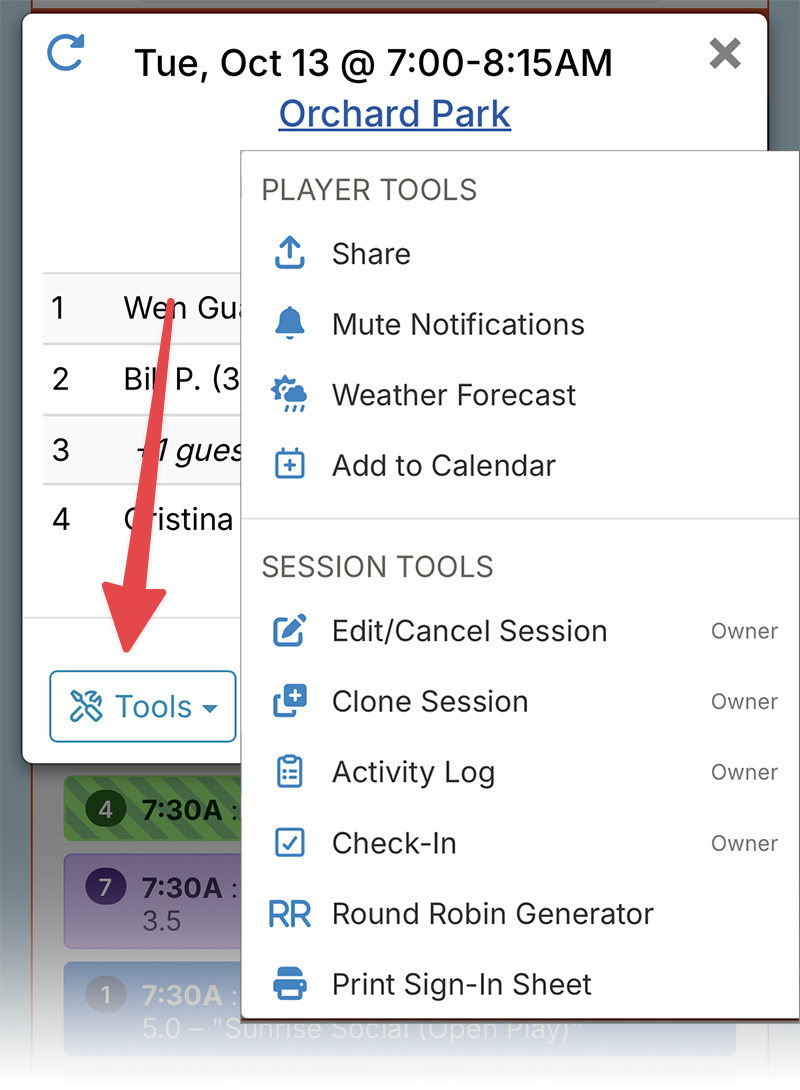
Our platform keeps growing, and with all these new features, things were getting a little crowded! We’ve refreshed a few key areas to give you more breathing room and make everyday tasks easier to find.
My Account now has its own dedicated screens, giving your player profile, notification preferences, and calendar settings a more spacious home.
On the session window, we’ve consolidated many player and session actions under a new “Tools" menu. Instead of scanning a growing collection of mysterious-looking icons, just click the “Tools” button in the bottom left corner to see all available actions. Text labels now make it much clearer what each button does. Paid features that you don’t have access to will be marked with a lock icon, and actions belonging only to the session creator will be marked “Owner."
These changes make room for everything you currently love about PlayTime Scheduler, plus many features still to come!
More Features, Less Clutter Pickleball Mastered: Stop Guessing Why You Lost Celebrating 10 Years:
Feed Me Seymour! Feed Me!Lazarus Naturals: Get a FREE Bag of Clarity Gummies!Celebrating 10 Years:
It's Treat Time! Paddle Pointers:
SelkirkTV – Beginner's Guide Something Wicked This Way Saves Celebrating 10 Years:
Tales From the Court < Previous IssueNext Issue >